Specifications by Code
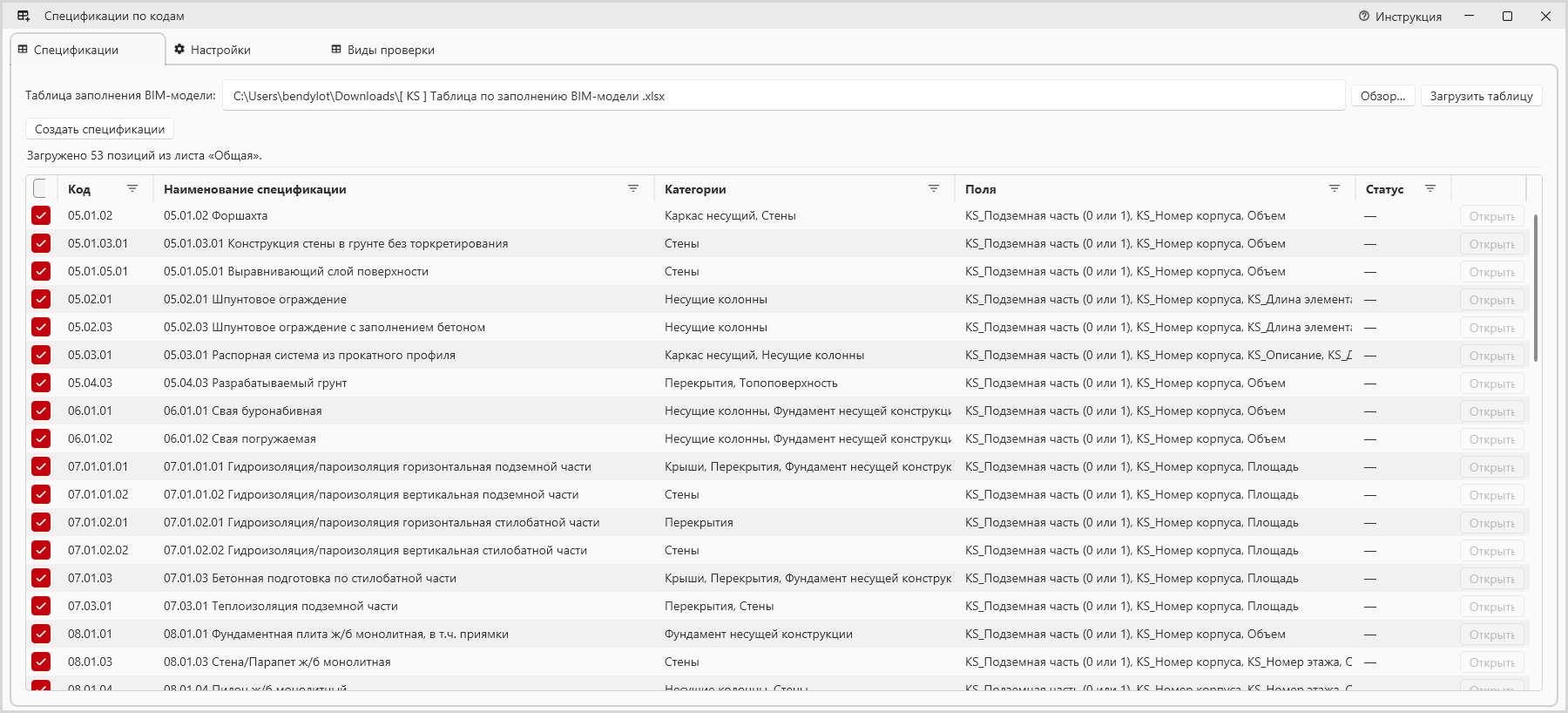
Specifications by classifier code and categories from a table
What it solves
Builds specifications by classifier codes and separate specifications by category from the BIM model completion table: fields, filters, check marks and ready-to-review views.
How it is used
- One specification per unique code
- Single-category and multi-category specifications
- Reads an .xlsx table directly from the plugin window
Getting started
- Download and install BimContour — every plugin comes with one installer.
- Open Revit and the BimContour tab on the ribbon.
- Run the plugin: the “Guide” button in the window opens step-by-step help.
Compatibility
Autodesk Revit 2022–2027; Windows 10/11.
Plugin results are for reference: verify them before using them in project documentation and keep backups of your model.
Reviews and rating
No reviews yet. Be the first — your review will appear after moderation.
Sign in to leave a review.
More plugins in this category
- Classifier Codes — classifier codes for model elements — with preview and ai suggestions
- Placeholder Code 999 — code 999 for elements invisible in 3d
- Mass by Section — grouping by section geometry and mass per linear meter